Coding with AI
Build apps with AI, present your creations, get real feedback, and improve live — then vibe code a new challenge together every week.
Every class has two parts: a student showcase with live improvement, and a themed group coding session.
What is Vibe Coding?
Vibe Coding is a new way of creating apps by describing what you want in plain language. Instead of writing complex code, you tell AI what you want to build, and it creates the app for you!
Imagine
Think of an app idea you want to create
Describe
Tell AI what you want in your own words
Create
AI generates your app instantly
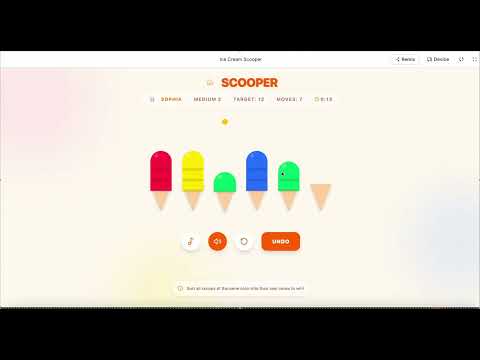
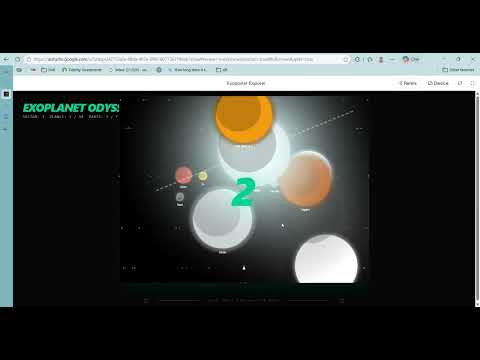
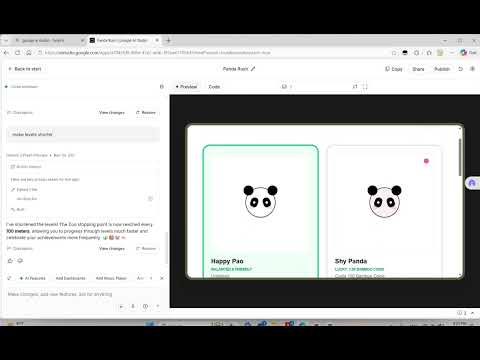
How Each Class Works
Every 120-minute session is split into two exciting parts
Show & Improve
Welcome & Warm-up
Quick hello, check everyone's setup, and introduce today's presenter.
Student Showcase
The rotating presenter shares their self-built app with the class — explaining their idea, how they prompted AI, and what challenges they faced. The app link is shared with everyone.
Play & Feedback
Everyone opens the shared link, plays with the app, and provides constructive feedback — what's great, what could be better, and new feature ideas.
Live Improvement
The presenter picks feedback to act on and improves the app live using Google AI Studio, while the class watches and learns from the process.
Vibe Code Together
Theme Reveal
The teacher announces today's vibe coding theme — connected to a school subject like Math, Science, History, Geography, Music, or PE.
Group Vibe Coding
Everyone builds their own version of the themed app using AI. Students can chat, share tips, and help each other along the way.
Presentations
Students take turns presenting what they built — demo the app, share the prompts they used, and explain what they learned. Everyone plays each other's creations!
Wrap-up
Celebrate wins, vote on favorite apps, and announce next week's Part 1 presenter.
When It's Your Turn to Present
Each student rotates as the presenter — here's how to prepare
Choose any app idea you're excited about
Build it at home using Google AI Studio
Get a shareable link ready for classmates
Prepare to explain your idea and prompts
Present with confidence — we're all learning!
Remember: You pick your own theme! Build whatever app excites you — a game, a tool, a fun experiment. Share the link in class so everyone can try it out.
Weekly Vibe Coding Themes
Each week's theme connects to what you're learning at school — Math, Science, History, Geography, Music, PE, and more. Turn your schoolwork into apps!
World Explorer
Create a map quiz or a country facts explorer
Science Lab
Simulate an experiment or create a flashcard app for the periodic table
History Timeline
Build an interactive timeline or quiz about a historical period
Math Practice
Build a times table trainer or fraction quiz to level up your math skills
Music Maker
Build a beat maker, a note trainer, or a music theory quiz
Fitness Tracker
Create a workout timer, exercise challenge, or sports trivia app
Spelling Bee
Build a vocabulary builder or spelling challenge game
Fun Game
Create any game you like — quiz, puzzle, adventure, or arcade!
Themes are chosen by the teacher each week to match what students are studying — these are just examples!
What You Need
Laptop
Each student needs their own laptop to participate. Any laptop with a modern web browser will work.
- Windows, Mac, or Chromebook
- Chrome, Firefox, or Edge browser
- Stable internet connection
Google AI Studio Account
Each student needs a Google AI Studio account set up before the first class. It's completely free to use!
- Free to create and use
- Requires a Google account
- Parent help may be needed for setup
Skills You'll Develop
Creative Thinking
Come up with unique app ideas on your own
Prompt Engineering
Learn to communicate with AI effectively
Presentation Skills
Present your work with confidence
Giving Feedback
Provide constructive, helpful suggestions
Iterative Design
Improve your app based on real feedback
Collaboration
Code together and learn from peers
Resources
View the class presentation and parents meeting slides to learn more about Vibe Coding
Workshop Details
Class Information
Each Class Includes
- 1.Student app showcase & live feedback
- 2.Play the presenter's app together
- 3.Live improvement based on feedback
- 4.Themed group vibe coding session
This workshop is coming soon — subscribe to be notified when it launches!
Subscribe